
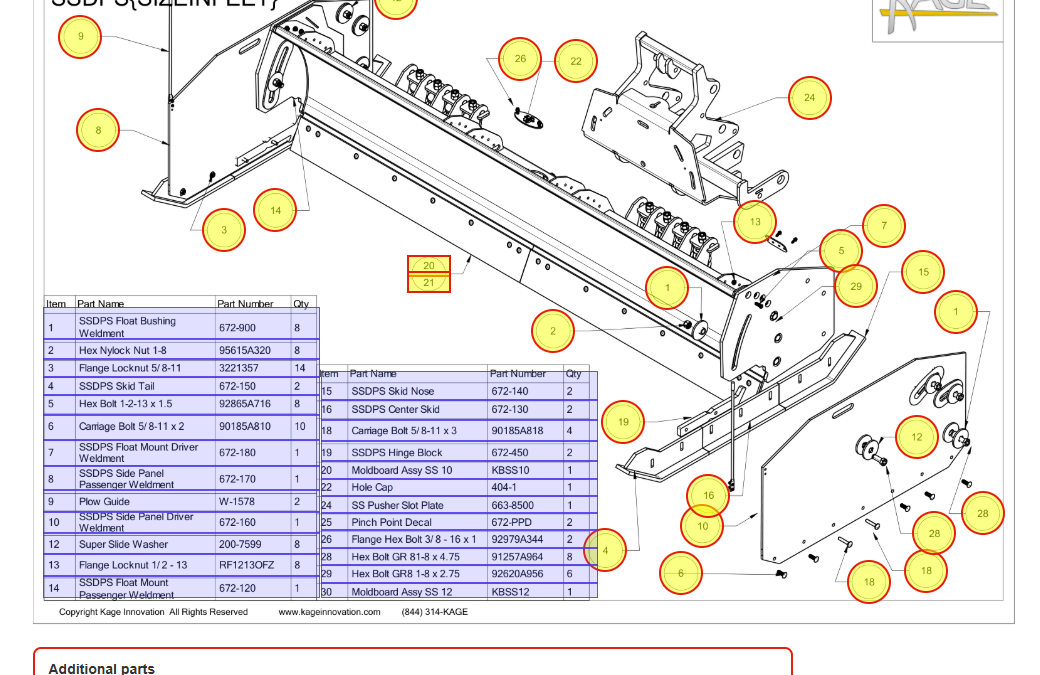
When a part on your KAGE equipment needs to be replaced, the hardest part shouldn’t be figuring out which part you need.
That’s why KAGE Innovation is introducing Web Schematics—an easier, more visual way to identify replacement parts and shop for them online.
Whether you’ve ordered KAGE parts online many times before, you’re visiting our online store for the first time, or you simply want to identify a part before calling us to place an order, Web Schematics are designed to make the process easier.
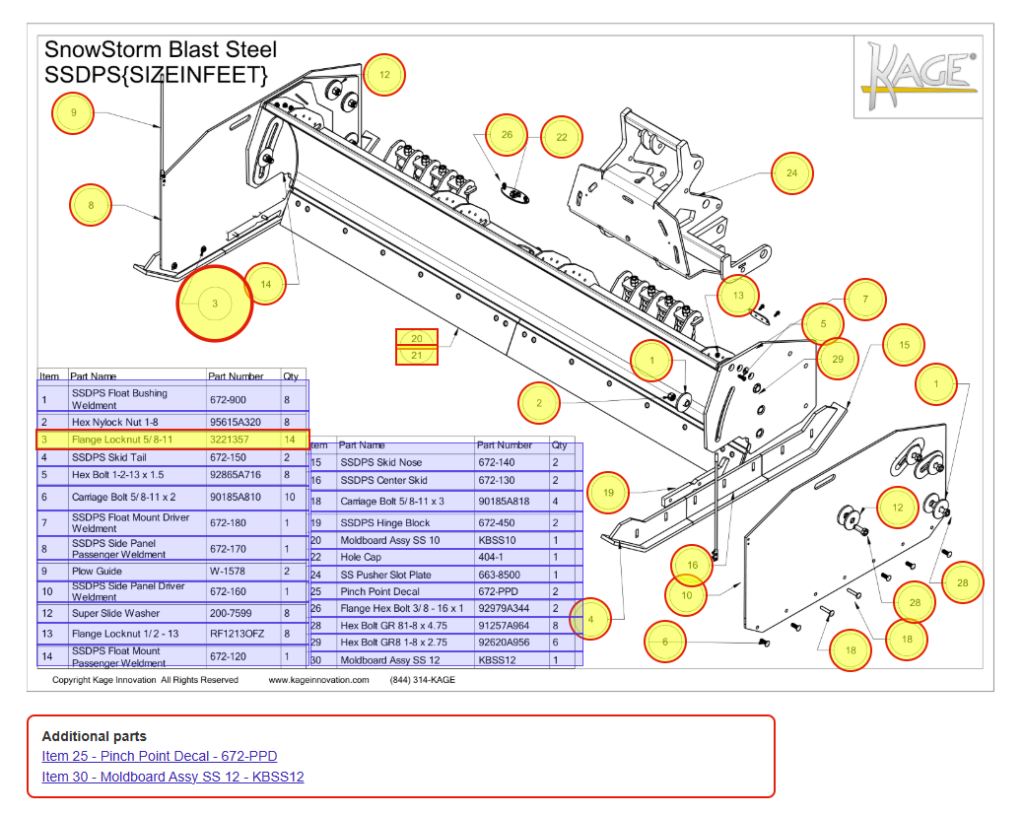 What Is a Web Schematic?
If you’ve ever looked at a parts breakdown for a piece of equipment, you’re probably familiar with an exploded-view drawing. It shows how the components fit together and uses numbered callouts to identify individual parts.
A KAGE Web Schematic takes that familiar parts drawing and makes it interactive.
Instead of finding a number on the drawing, searching through a parts list, writing down a part number, and then searching for that part separately, you can use the schematic to quickly connect what you see on the drawing with the replacement part you need.
In other words, see the part, identify the part, and get where you need to go faster.
A Simpler Way to Shop for Replacement Parts
Finding the correct replacement part online can sometimes feel like a guessing game.
Maybe you know exactly what the part looks like but don’t know what KAGE calls it. Maybe several parts have similar names. Or perhaps you have a part number but aren’t completely confident that it belongs to the component you’re looking at.
Web Schematics help remove that uncertainty by letting you start with something much more familiar: your equipment.
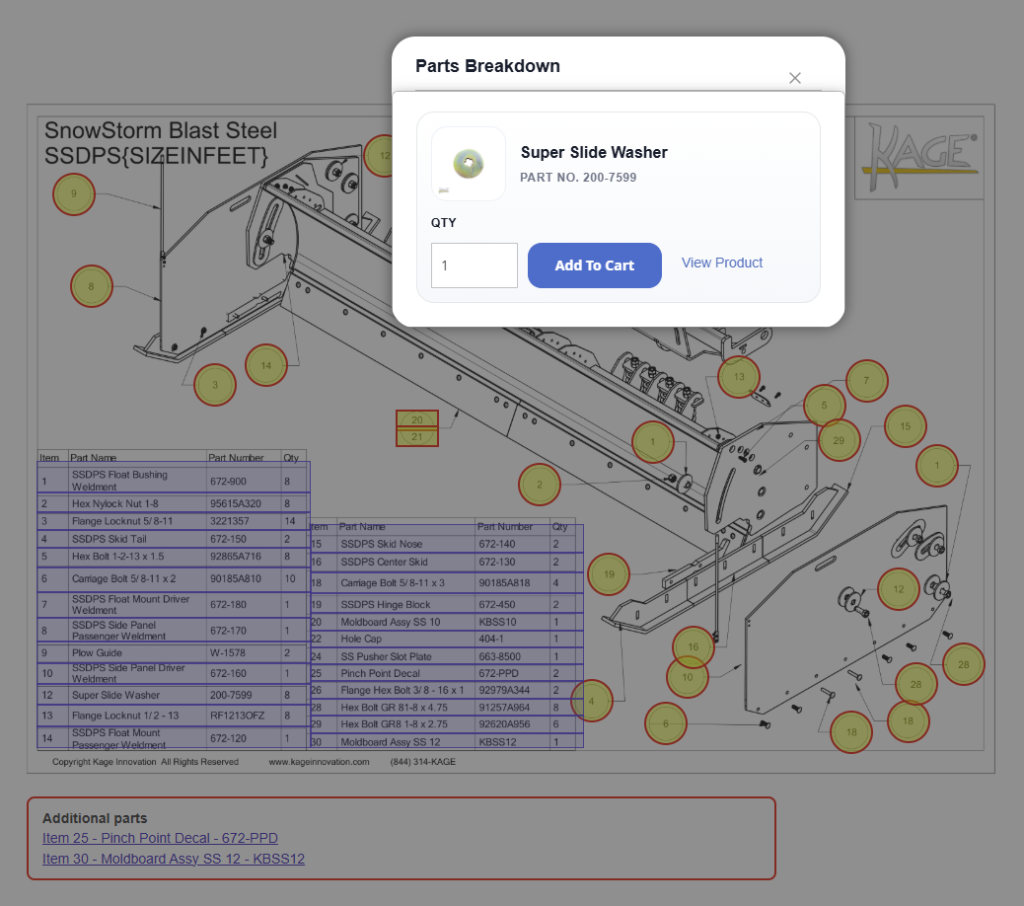
Find the area of the machine you’re working on, locate the component in the drawing, and use the corresponding callout to identify the part.
When an online product page is available for that part, the Web Schematic can take you directly to it. That means less searching through categories, fewer part numbers to copy and paste, and a more direct path from “That’s the part I need” to the correct product.
New to Ordering KAGE Parts Online? Start with the Picture.
If this is your first time shopping for KAGE replacement parts online, you don’t need to be an expert at navigating an online parts catalog.
Web Schematics give you a visual starting point.
Instead of wondering which category to choose or what terminology to type into a search bar, you can begin with the equipment and parts drawing you’re already trying to repair.
That’s especially helpful when you can recognize a component but don’t know its exact name.
You may be thinking, “I need that bracket right there,” rather than, “I need part number XXXXX.”
That’s okay.
The Web Schematic helps bridge that gap.
Already Order KAGE Parts Online? Now It’s Even Easier.
If you’ve purchased replacement parts through KAGE’s website before, you may already have your own routine: find the parts breakdown, determine the item number, locate the part number, and then search for the product online.
Web Schematics are designed to shorten that process.
Rather than treating the drawing, parts list, and online store as separate steps, the interactive schematic connects them. You can visually identify what you need and move directly toward the corresponding part online.
It’s the same KAGE equipment and the same replacement parts—just a more convenient way to find them.
Not Ordering Online? Web Schematics Can Still Help.
We know not every customer wants to place an order online.
Sometimes you’d rather call KAGE and talk to someone directly. Web Schematics can make that conversation easier, too.
Before you call, pull up the Web Schematic for your equipment and locate the part you’re asking about. The drawing can help you identify the item and the corresponding part information so you have something specific to reference when speaking with KAGE.
Instead of trying to describe “the piece behind the other bracket on the left side,” you may be able to tell us exactly which item you’re looking at.
That can help everyone get on the same page faster and reduce the chance of ordering the wrong component.
And if you’re unsure whether you’ve identified the correct part, that’s fine too. The schematic gives you and the KAGE team a common visual reference to work from.
Spend Less Time Searching and More Time Getting Back to Work
When equipment needs a replacement part, you usually aren’t browsing for fun. You have a job to finish and equipment you want back in service.
That’s ultimately what KAGE Web Schematics are about: making replacement parts easier to find.
They can help you:
- Visually identify the component you need.
- Match components on your equipment to KAGE replacement parts.
- Navigate to available replacement parts online more quickly.
- Reduce searching and uncertainty when similar parts are available.
- Find useful part information before contacting KAGE.
- Communicate more clearly with the KAGE team when ordering by phone.
- Feel more confident that you’re looking at the right part before placing an order.
Look. Click. Find Your Part.
You shouldn’t need to know the exact name of every nut, bracket, pin, blade, plate, or assembly on your KAGE equipment to find the replacement part you need.
Sometimes the easiest way to find a part is simply to see it.
With KAGE Web Schematics, start with the drawing, find the component you’re looking for, and let the schematic help guide you from there.
Know what you need? Shop online.
Know what it looks like but not what it’s called? Use the Web Schematic to identify it.
Prefer to order by phone? Use the schematic to find the part, then give KAGE a call.
However you prefer to purchase your replacement parts, KAGE Web Schematics give you an easier place to start.
Find your equipment. Find your part. Get back to work.
Recent Comments